
Most screenwriters don't realize their scripts are rejected before page ten due to formatting errors, not story quality. Industry readers see hundreds of scripts monthly, and improper margins, inconsistent fonts, or unclear scene headings signal amateur work instantly. This guide teaches you how to format scripts correctly using industry standards and explains how professional feedback helps writers avoid structural and marketability mistakes that cause automatic rejection. You'll learn preparation steps, execution techniques, and verification methods to polish your screenplay and increase your chances with producers, managers, and festivals.
Table of Contents
- Why Getting Script Formatting Right Matters
- Preparing Your Script For Professional Feedback
- Step By Step Script Formatting Essentials
- Troubleshooting Common Formatting Mistakes
- Get Expert Script Feedback To Boost Your Success
- FAQ
Key takeaways
| Point | Details |
|---|---|
| Professional feedback identifies errors early | Expert readers catch structural and formatting flaws before costly submissions. |
| Industry standard formats prevent rejection | Scripts must use Courier 12pt, proper margins, and clear headings to pass initial review. |
| Human readers provide nuanced evaluation | Emotional depth and character authenticity require human judgment beyond AI detection. |
| Tailored packages focus on specific markets | Theatrical, series, and festival feedback addresses unique format and story requirements. |
| Detailed notes improve marketability | Scene level fixes enhance pacing, character arcs, and emotional resonance for buyers. |
Why getting script formatting right matters
Proper formatting presents your screenplay in the script format that impacts production and pitch success by ensuring industry professionals can read it effortlessly. Producers, managers, and development executives evaluate dozens of scripts weekly. They need consistent formatting to estimate runtime, visualize scenes, and assess pacing without distraction. When your script follows standard conventions, readers focus on your story rather than deciphering irregular layouts or guessing scene transitions.
Formatting errors overshadow exceptional stories by creating immediate credibility issues. A title page missing contact information, inconsistent font sizes, or improperly spaced dialogue blocks signal inexperience. Readers assume writers who ignore formatting standards also lack understanding of story structure, character development, and professional protocols. This perception causes instant dismissal regardless of plot originality or compelling characters.
A well formatted script supports story pacing and character clarity through visual rhythm on the page. White space around action lines creates breathing room for emotional beats. Concise dialogue blocks maintain conversational flow. Proper scene headings establish location and time instantly. These elements work together to guide readers through your narrative smoothly, making emotional moments land with impact and plot twists feel earned.
Professional feedback helps writers avoid structural and marketability mistakes that cause automatic rejection by revealing formatting flaws you've become blind to after multiple revisions. Expert readers identify issues like inconsistent capitalization in character introductions, missing transitions between time jumps, or action lines that run too long. They also evaluate how formatting choices affect storytelling effectiveness, such as whether your scene descriptions convey visual information economically or bog down pacing with unnecessary detail.
Key formatting areas demand precision to meet industry expectations:
- Title page must include script title, writer name, contact information, and proper margins without logos or graphics
- Scene headings require INT. or EXT., specific location, and time of day in all caps
- Action lines stay left justified, present tense, and under four lines per block
- Dialogue centers character names in caps with dialogue indented below
- Transitions like CUT TO: or FADE OUT: appear right justified only when essential
"The difference between a formatted script and a mess is whether someone reads past page five. Formatting is your audition for being taken seriously."
Preparing your script for professional feedback
Gather a clean, properly formatted draft before submitting for expert evaluation to maximize the value of detailed notes. Run a spelling and grammar check to eliminate obvious typos. Ensure your scene numbering is consistent if you've added or removed sequences. Export your script as a PDF to preserve formatting across different devices and software. This preparation allows reviewers to focus on substantive story and structure issues rather than basic cleanup tasks.
Choose a feedback package based on your script's target market to receive relevant notes on structure and format. Theatrical scripts need marketplace analysis covering commercial viability, comparable films, and casting considerations. Series pilots require evaluation of episode structure, season arc potential, and episodic storytelling rhythm. Festival submissions benefit from notes on artistic merit, thematic depth, and originality that appeal to competition judges. Feedback packages are tailored to needs like theatrical marketplace analysis and festival notes, with a 14-day turnaround.
Provide supporting materials to give reviewers context for targeted feedback:
- Write a concise logline summarizing your story's core conflict and protagonist in one sentence
- Create character summaries for your main cast covering goals, obstacles, and arcs
- Include any prior feedback or specific concerns you want addressed
- Specify your intended audience and comparable films in your genre
- Note any formatting experiments or stylistic choices that deviate from standards intentionally
Expect detailed notes covering story structure breakdown, character development, pacing rhythm, and formatting precision. Professional readers analyze your three act structure, evaluate whether plot points land at appropriate page counts, and assess if character transformations feel earned. They identify scenes that drag, dialogue that feels expository, and action sequences that lack visual clarity. Formatting notes highlight inconsistencies in scene headings, dialogue mechanics, and page layout that distract from your narrative.
Set realistic timelines to integrate feedback efficiently without rushing revisions. Budget two weeks for receiving notes, then another month for implementing major structural changes. Schedule a second draft review if you've made significant alterations to story beats or character arcs. This measured approach prevents hasty fixes that create new problems while allowing you to thoughtfully address each note's underlying concern.
Pro Tip: Create a feedback integration checklist that prioritizes structural issues first, then character notes, then formatting polish. This hierarchy ensures you don't waste time perfecting scene headings on sequences you'll ultimately cut during story revisions.
Step by step script formatting essentials
Format your title page with correct specifications to establish professionalism from the first impression. Center your script title in all caps approximately one third down the page. Place "Written by" two lines below the title, then your name two lines after that. Position your contact information in the lower left corner including email and phone number. Use standard one inch margins on all sides. Never include copyright symbols, registration numbers, or draft dates unless specifically requested by a producer.

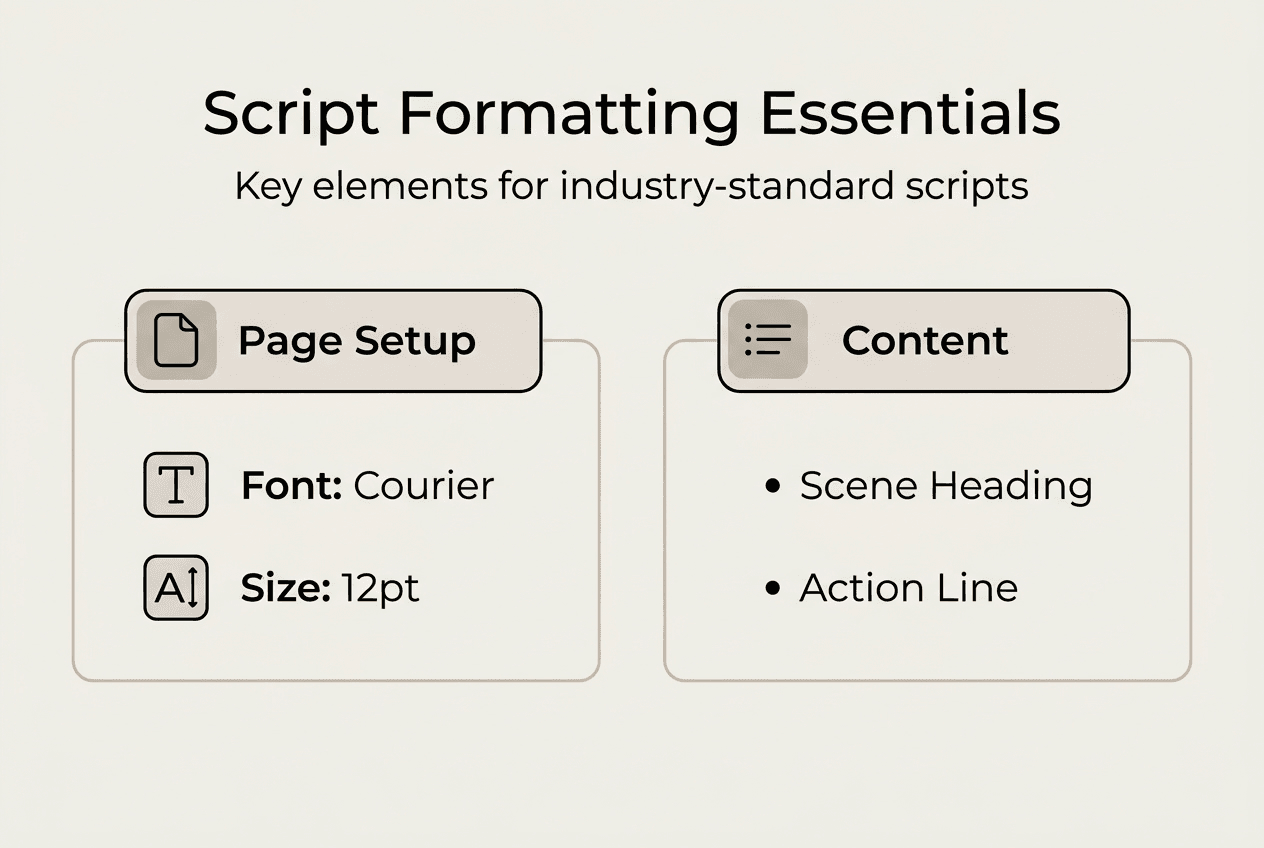
Use Courier 12 point font exclusively throughout your screenplay to maintain industry timing standards. This monospaced typeface ensures one page equals roughly one minute of screen time, allowing readers to estimate runtime accurately. Set top and bottom margins to one inch, left margin to 1.5 inches, and right margin to one inch. These specifications create proper white space and accommodate binding without cutting off text.
Write clear scene headings following the INT./EXT. LOCATION – TIME format consistently:
- Begin each new scene with a scene heading on its own line
- Start with INT. for interior locations or EXT. for exterior settings
- Follow with the specific location in all caps (COFFEE SHOP, BEDROOM, PARKING LOT)
- Add a dash or hyphen, then time of day (DAY, NIGHT, MORNING, DUSK)
- Use CONTINUOUS for scenes flowing immediately from the previous location
Limit dialogue verbosity by keeping character speeches under four lines per block when possible. Long monologues tire readers and slow pacing. Break extended speeches with action beats showing physical reactions or environmental changes. This technique maintains visual storytelling rhythm and prevents static talking head scenes. Detailed notes in feedback cover specific fixes at scene level to improve emotional resonance and market fit.
Keep action lines concise and visually focused on what the camera captures. Describe only what viewers see or hear, avoiding internal thoughts or backstory exposition. Use short paragraphs of two to four lines maximum. Start new paragraphs when changing focus to different characters or shifting to new visual elements. This creates white space that makes pages feel quick and dynamic rather than dense and literary.
| Element | Specification | Example |
|---|---|---|
| Scene Heading | All caps, INT./EXT. format | INT. KITCHEN – MORNING |
| Character Name | Centered, all caps, above dialogue | SARAH |
| Dialogue | Indented below character name | I can't believe you did this. |
| Action Line | Left justified, present tense | Sarah slams the door and storms out. |
| Parenthetical | Centered below character name | (whispering) |
Avoid common formatting errors like double spacing improperly between elements. Single space within dialogue blocks and action paragraphs. Double space between scene headings and action, between action and character names, and between dialogue blocks when characters alternate speaking. Never triple space or add extra line breaks for emphasis, as this disrupts page count accuracy and appears amateurish.
Pro Tip: Use screenwriting software like Final Draft, WriterDuet, or Highland 2 to automate proper formatting. These programs handle margins, indentation, and spacing automatically while you focus on storytelling.
Troubleshooting common formatting mistakes
Common mistakes plague even experienced writers who've developed bad habits over multiple drafts. Improper margins throw off page count estimates and create unprofessional appearance. Inconsistent font or size mixing Courier with Arial or switching between 10pt and 12pt destroys timing accuracy. Unclear scene headings missing INT./EXT. designations or time of day force readers to guess setting details. Excessive dialogue running six or eight lines without breaks creates walls of text that slow reading pace. Poor spacing adding random line breaks or removing necessary double spaces between elements disrupts visual flow.
Professional readers point out issues that automated spelling and grammar tools miss completely. Software can't detect when your action lines describe internal emotions rather than external behavior. It won't flag dialogue that sounds unnatural when read aloud despite being grammatically correct. Human feedback identifies when your scene descriptions bury crucial visual information in wordy paragraphs or when character introductions lack memorable physical details. Human feedback emphasizes emotional resonance and character authenticity beyond AI evaluations.
| Typical Mistake | Corrected Formatting | Impact |
|---|---|---|
| Missing scene heading time | Add DAY, NIGHT, or specific time | Establishes temporal context clearly |
| Action lines over five lines | Break into shorter paragraphs | Improves readability and pacing |
| Character name lowercase | Use all caps for first introduction | Signals new character properly |
| Dialogue without character name | Always precede dialogue with centered name | Prevents confusion about speakers |
| Transitions overused | Reserve for essential time/location jumps | Maintains professional restraint |
Avoid redundancy in scene descriptions by trusting readers to infer obvious information. You don't need to write "She walks across the room and sits down in the chair" when "She sits" conveys the same action. Cut adverbs and adjectives that don't add visual specificity. "Quickly" and "angrily" tell rather than show, whereas "sprints" and "slams the glass down" create concrete images. This economy of language keeps pages moving and demonstrates writing craft.
Adhere to style guides that explain dialogue's role in maintaining pace and avoiding rejection through verbosity. Professional scripts use parentheticals sparingly, only when tone isn't clear from dialogue and context. They avoid camera directions like "we see" or "the camera pans" unless you're also directing. They maintain consistent verb tense in action lines, always present tense to create immediacy. These conventions exist because they work, tested across thousands of produced films.
Improve script flow by reading your screenplay aloud to catch awkward phrasing and unnatural dialogue rhythms. Listen for repetitive sentence structures in action lines or characters who all sound identical. Notice where you stumble over complex scene headings or lose track of who's speaking. These friction points reveal formatting and writing issues that disrupt reader experience. Professional feedback provides this objective perspective when you've become too close to your material.
Pro Tip: Invest in human feedback rather than relying solely on AI alternatives for authentic script evaluation. Algorithms detect surface errors but miss whether your protagonist's transformation feels emotionally true or if your theme emerges organically from character choices. Human readers bring industry experience and storytelling intuition that technology can't replicate.
Get expert script feedback to boost your success
Professional feedback from experienced industry insiders dramatically improves your script's chances with buyers, managers, and festival committees who receive thousands of submissions annually. Expert readers provide actionable notes on format precision, structural integrity, character development, and marketplace positioning that transform good scripts into competitive ones. They identify weaknesses you've overlooked after months of revision and highlight strengths you should emphasize in loglines and pitches.
Affordable packages with detailed coverage start at accessible price points, delivering comprehensive analysis without the premium costs of traditional script consultants. You receive specific notes on scene level fixes, dialogue improvements, and formatting corrections alongside big picture evaluation of concept viability and genre execution. Fast turnaround times mean you get feedback within days rather than weeks, keeping your momentum and allowing you to implement changes while story details remain fresh. Roast My Script offers AI powered script analysis that identifies structural issues and formatting problems quickly, serving as your brutal filter before investing in expensive coverage or submitting to competitions. The service provides professional grade evaluation at a fraction of traditional costs, helping you polish your screenplay until it meets industry standards and maximizes your success potential.
FAQ
What is the standard font and size for script formatting?
The industry standard is Courier 12 point font for all screenplays, ensuring uniform timing estimates where one page equals approximately one minute of screen time. This monospaced typeface has been the professional convention for decades because it creates consistent character spacing that readers and producers rely on for accurate runtime calculations. Using any other font or size immediately marks your script as amateur work and risks rejection before anyone reads your story.
How does professional feedback improve my script?
Professional feedback reveals structural weaknesses, formatting inconsistencies, and character development gaps that you can't see after multiple revisions of your own work. Expert readers provide actionable fixes for specific scenes, identify pacing problems that drag or rush crucial moments, and evaluate whether your story delivers on its premise with satisfying emotional payoff. This outside perspective enhances character authenticity, sharpens dialogue, and increases your script's appeal to buyers and festival judges who compare your work against hundreds of other submissions.
Can AI tools replace human script feedback?
AI tools detect formatting errors and flag basic structural issues but completely miss emotional depth, character authenticity, and thematic resonance that determine whether scripts connect with audiences. Algorithms can't evaluate if your protagonist's transformation feels earned, whether your dialogue sounds natural when performed, or if your theme emerges organically from story events. The service explicitly avoids AI feedback because emotional resonance and authenticity need human judgment. Human readers bring industry experience, storytelling intuition, and marketplace knowledge that technology cannot replicate, making their evaluation essential for serious writers.
What should I provide when submitting my script for feedback?
Submit a properly formatted PDF of your complete screenplay along with a concise logline that captures your story's core conflict in one sentence. Include brief character summaries for your main cast covering their goals, obstacles, and emotional arcs to give reviewers context. Specify your target market whether theatrical, streaming series, or festival competition and note any particular concerns you want addressed such as pacing in act two or believability of your antagonist's motivation. This supporting information helps readers provide tailored feedback that addresses your specific development needs rather than generic notes.
Recommended
- Script format impact: 90% boost production & pitch success | ROAST MY SCRIPT
- What is script coverage? Your 2026 guide to expert feedback | ROAST MY SCRIPT
- Top 4 aiscriptreader.com Alternatives 2026 | ROAST MY SCRIPT
- What is a script reader? A 2026 guide for screenwriters | ROAST MY SCRIPT
- WordPress Help Guide: Expert Solutions for 2025 - WPCTO